LPB Piso WiFi:
How the LPB Piso Wifi System works, prices, payment, Pause Time, and troubleshooting
LPB Piso WiFi is one of the most widely used Piso WiFi systems in the Philippines. If you have ever connected to a public WiFi hotspot in a sari-sari store, boarding house, small café, or neighborhood WiFi vendo and were redirected to a page like http://10.0.0.1, you were most likely using a Piso WiFi vending machine powered by firmware commonly referred to as LPB Piso WiFi.
This guide explains LPB Piso WiFi in detail, including how the system works, typical pricing structures, how users pay for internet time, how the pause and resume feature works, and how to troubleshoot common problems. The purpose is to help users understand the system clearly and avoid losing paid minutes due to simple mistakes.
What Is LPB Piso WiFi?
LPB Piso WiFi is a time-based internet access system designed for public or semi-public use. Instead of paying a monthly subscription like home internet, users insert coins or enter voucher codes to receive a fixed amount of browsing time.
The system uses a router combined with captive portal software. When a device connects to the WiFi network, internet access is blocked until the user opens the portal page and completes payment. This portal page is hosted locally and is usually accessed through the private IP address 10.0.0.1.
How LPB Piso WiFi Works
LPB Piso WiFi works by tracking time per device session. Once payment is made, the system authorizes that device and starts a countdown timer. While the timer is running, the user can browse the internet normally.
Most LPB setups identify sessions using the device’s MAC address and browser session data. Because of this, changing devices, switching browsers, or clearing cookies can cause paused sessions or remaining time to disappear. Using the same device and browser is important for session stability.
Typical LPB Piso WiFi Prices
There is no single fixed price for LPB Piso WiFi across the Philippines. Prices are set by individual operators based on internet costs, location, and expected usage.
Common examples include ₱5 for 30 minutes, ₱10 for one to two hours, or higher amounts for longer access. Some locations offer promotional pricing such as bonus minutes for higher payments or discounted rates during off-peak hours.
Prices are always displayed on the portal page before payment. If you are unsure about the rate, check the portal carefully before inserting coins or entering a voucher code.
How to Connect to LPB Piso WiFi
Step 1: Connect to the WiFi Network
Open your phone or laptop’s WiFi settings and connect to the Piso WiFi network name shown nearby. The network name may include words such as PisoWiFi, LPB, FreeWiFi, or the store name.
It is normal for your device to show “Connected, no internet” at this stage. This simply means your session has not yet been authorized through the portal.
Step 2: Open the Portal Page
Turn off mobile data to ensure your device uses the WiFi connection. Open a browser such as Google Chrome or Safari and type http://10.0.0.1 in the address bar.
If the portal does not open, try visiting http://neverssl.com to trigger the captive portal redirect. Once redirected, return to 10.0.0.1 to continue.
How to Pay for LPB Piso WiFi
LPB Piso WiFi machines usually support coin-based payment, voucher codes, or both. The available options depend on how the operator configured the system.
Paying with Coins
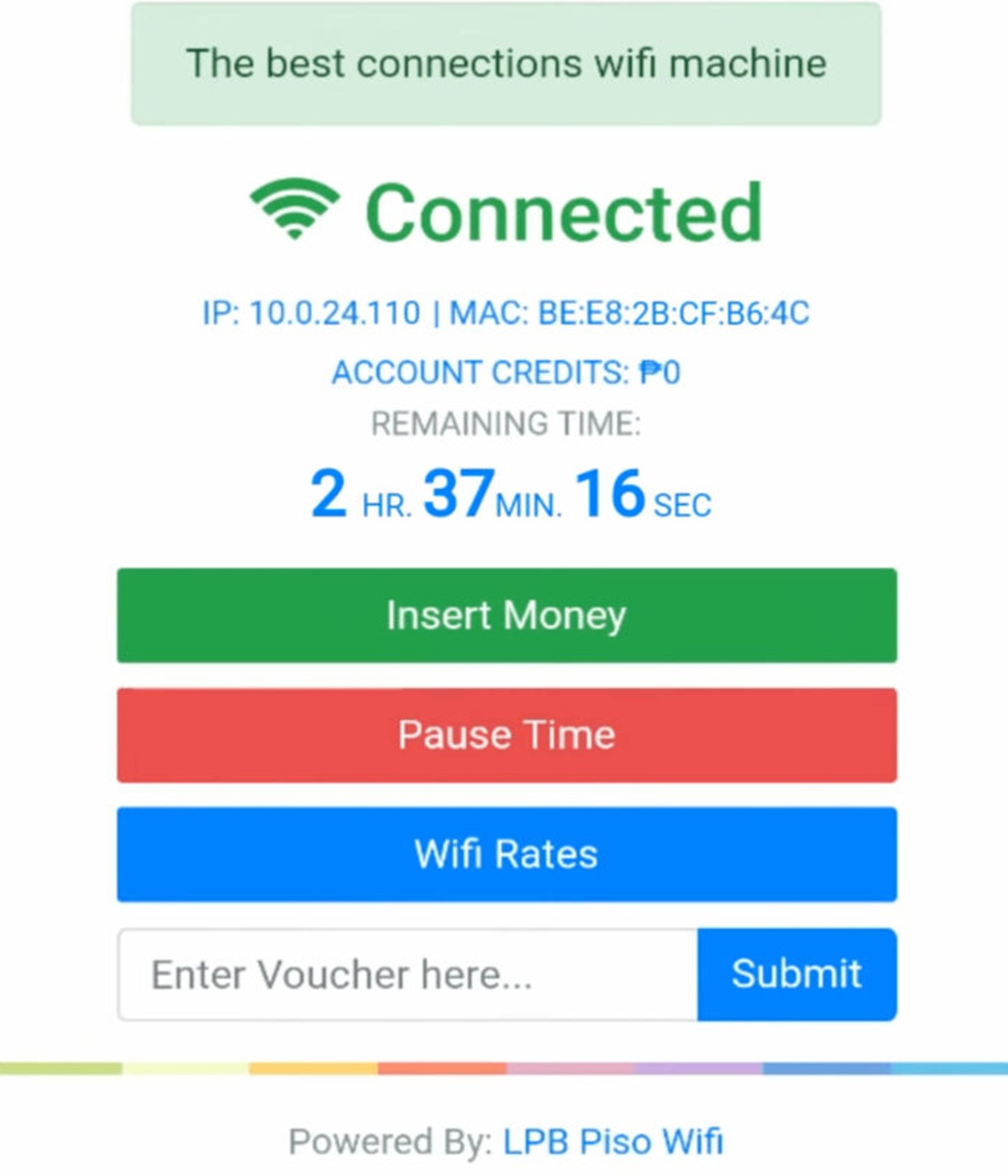
Insert coins into the vending machine according to the instructions displayed near the slot. The portal page should automatically update and show your remaining time once the coins are accepted.
If the time does not appear immediately, refresh the portal page once and wait a few seconds. On busy networks, updates may be delayed.
Paying with Voucher Codes
Some LPB setups allow voucher codes instead of coins. These codes are usually sold by the operator or provided as part of promotions.
To redeem a voucher, open http://10.0.0.1, locate the voucher or code input field, enter the code carefully, and submit it. Pay close attention to characters such as 0 and O or 1 and l, which are easy to confuse.
How Pause Time Works on LPB Piso WiFi
The Pause and Resume feature allows users to temporarily stop the countdown of their internet time. This prevents paid minutes from being wasted when stepping away or experiencing brief disconnections.
Pause time is optional and controlled by the operator. Some LPB machines allow pausing freely, while others restrict it or disable it entirely. In some setups, pause is only allowed when remaining time is above a certain limit.
How to Pause Internet Time
Connect to the LPB Piso WiFi network and open http://10.0.0.1 in your browser. Navigate to the session dashboard where your remaining time is displayed.
Tap or click the Pause Time button and wait for confirmation that your session has been paused. Stay connected for a few seconds to ensure the system records the pause correctly.
How to Resume Paused Time
Reconnect to the same WiFi network using the same device and browser. Open http://10.0.0.1 again and locate your session dashboard.
Tap Resume Time and confirm that the countdown timer starts running again.
Tips to Avoid Losing Pause Time
Always use the same device and browser during your session. Avoid Incognito or Private browsing mode, as it may not store session data properly.
Do not clear browser cookies or cache while your time is paused. Taking a screenshot of your remaining time before disconnecting can also be helpful.
Common LPB Piso WiFi Problems and Solutions
10.0.0.1 Is Not Opening
Confirm that you are connected to the correct WiFi network and that mobile data and VPNs are turned off. Always type http://10.0.0.1 with http:// included.
If necessary, visit http://neverssl.com to force the portal redirect, then try again.
Connected to WiFi but No Internet
This usually means your session has not been authorized yet. Open the portal and complete payment or voucher entry.
Once authorized, internet access should begin automatically.
Pause Button Is Missing
If you do not see the pause button, verify that you have active remaining time. If you do, the operator may have disabled pause for that machine.
There is no user-side fix if pause is disabled by the admin.
Pause Time Disappeared
Pause time may disappear if you switch devices, change browsers, or clear cookies. Reconnect using the same device and browser and check the dashboard again.
If the vending machine rebooted or lost power, the session may have reset completely.
Is LPB Piso WiFi Safe to Use?
LPB Piso WiFi is a shared public network and should be treated like any other public WiFi. Avoid entering sensitive information on unsecured pages.
Use HTTPS websites whenever possible and enable two-factor authentication on important accounts to reduce risk.
Frequently Asked Questions About LPB Piso WiFi
Why does LPB Piso WiFi use 10.0.0.1?
10.0.0.1 is a private IP address commonly used for captive portals. It works only within the local WiFi network, making it ideal for Piso WiFi systems.
Can I pause my time on every LPB Piso WiFi?
No. Pause time depends entirely on the operator’s configuration. Some machines allow it, while others disable it.
What should I do if I lose my remaining minutes?
Reconnect using the same device and browser and check the portal again. If the system reset, politely ask the operator for help if possible.
LPB Piso WiFi remains popular in the Phillipines because it provides affordable and flexible internet access. Understanding how the system works, how to pay correctly, and how to use pause time properly can save users money and frustration.
If problems occur, follow the troubleshooting steps above, one at a time. Most issues are caused by simple factors such as mobile data interference, browser behavior, or portal redirects rather than serious system failures.